Verifas Networks
Contact us
VOICELABActive testing and assurance for voice networks

Verifas VoiceLab is a SIP protocol testing tool: it places real calls through your network, with real audio, and tells you when a route breaks, with the SIP call flow and packet capture already attached.

SIP call testingVoIP SLA monitoringVoIP load testingNegative SIP testingAI assistant
SIP ladder — call-id 8f2a…e91cPASS
CallerSBCCallee0.000INVITE0.041100 Trying0.052INVITE0.598180 Ringing0.612180 Ringing2.091200 OK2.104200 OK2.118ACK2.126ACKRTP · PCMA · both directions
MOS
0.0
Jitter
0.0ms
Packet loss
0.0%
Tested on the wire
SIPRTP / RTCPSRTPSIP over TLSIPv6G.711G.722G.729OpusAMR-WBRFC 2833 DTMFRFC 3428 MESSAGERFC 4103 RTTPRACKSession timers
0codecs per test
G.711 through AMR-WB
0SIP transports
UDP, TCP and TLS, v4 and v6
0ways to deploy
Cloud, hybrid or air-gapped
9inbound ports
Agents dial out over HTTPS
Platform

One platform for every question you ask a voice network

A call placed from the console, a scheduled test and a load run all become records you can search, compare and put in a report. It covers call testing from the browser, scheduled monitoring, load testing and hand-written SIP for negative tests.

01
SIP call flow capture and analysis
Every SIP transaction with per-message timing, and the pcap behind it. See exactly where a call setup, transfer or teardown breaks, in a call from VoiceLab or in a pcap you upload.
02
Voice quality monitoring
Score every stream on jitter, packet loss and MOS, on a schedule, with per-frame drill-down when the number alone is not enough.
03
Always-on VoIP SLA testing
Scheduled calls on every route, each judged by its own rule: on a busy-line test a 486 is a pass and a 404 is not. A missed threshold opens an incident.
04
Reporting that leaves the building
Build a report from any test data, schedule it by email, and export it as PDF, XLSX or HTML for people who will never log in.
05
Test from where it matters
Agent nodes place traffic from inside your own networks, with their own addresses, so a test leaves from somewhere your infrastructure recognises.
06
Automated SIP test pipeline
Drive suites from CI through the API and CLI and gate every network change, with JUnit output your pipeline already knows how to read.
What a test can cover
Protocol details in the FAQ →
CodecsG.711 (PCMU, PCMA), G.722, G.729, Opus, GSM, AMR and AMR-WB
TransportSIP over UDP, TCP and TLS, on IPv4 and IPv6
DTMFRFC 2833 or SIP INFO, chosen per SIP profile
Messaging and textSMS as SIP MESSAGE (RFC 3428) and real-time text (RFC 4103)
Signalling controlPRACK, session timers, custom headers, raw SDP and hand-written SIP
By earA browser softphone: your microphone bridged into a real SIP call
How it works

A real call, placed and measured

Not a reachability check and not a packet capture you have to read yourself.

01
An agent places a real call
From our cloud, or from a node on your own network so the call originates somewhere your infrastructure recognises. A real registration, a real INVITE, real RTP.
02
Signalling and audio are both captured
Every SIP transaction with its timing, and the received audio compared against the reference that was sent — so the score reflects what actually arrived, not what the trunk reported.
03
You get a verdict, not a dashboard to interpret
Pass or fail against thresholds you set, with the failing call already captured. Run it once for a cutover, or on a schedule.
See it working

The actual product, not a mockup

Screenshots from a live tenant. Real calls, real measurements, real failures.
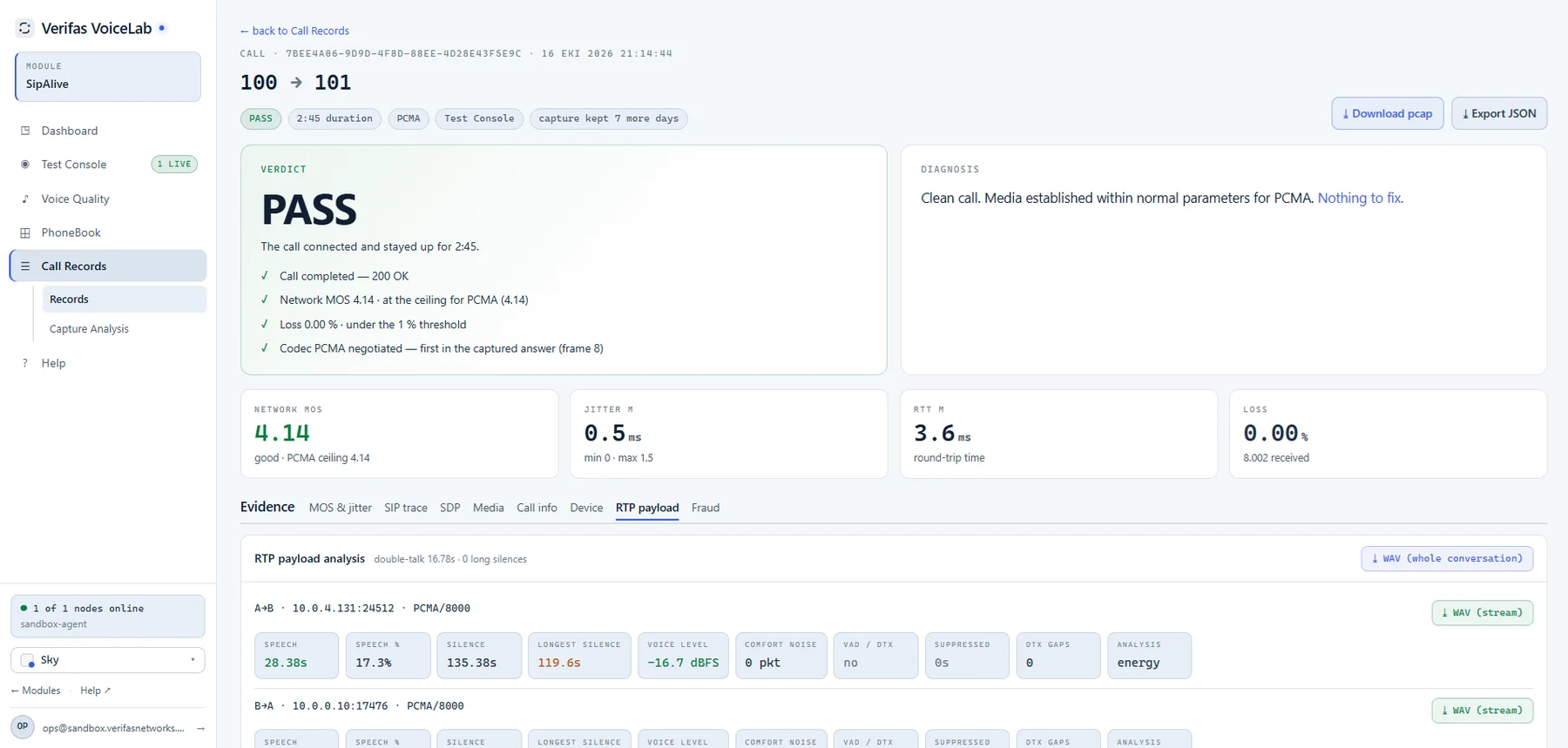
VoiceLab · Call testing · Verdict
A verdict, not a number to interpret: what was checked, the thresholds it was judged against, and the RTP payload analysis for each direction.
VoIP load testing

Find where a route stops coping, at a load you choose

Ramp real SIP calls at an SBC or trunk, as the caller, the answerer or both ends, and read off the point where calls start to fail. Safety rails keep the traffic pointed only where it is allowed to go.

  • Calls-per-second ramps and concurrency targets
  • Caller, answerer, or both ends of the call at once
  • Fail-closed target allowlist, hard caps and a dead-man switch
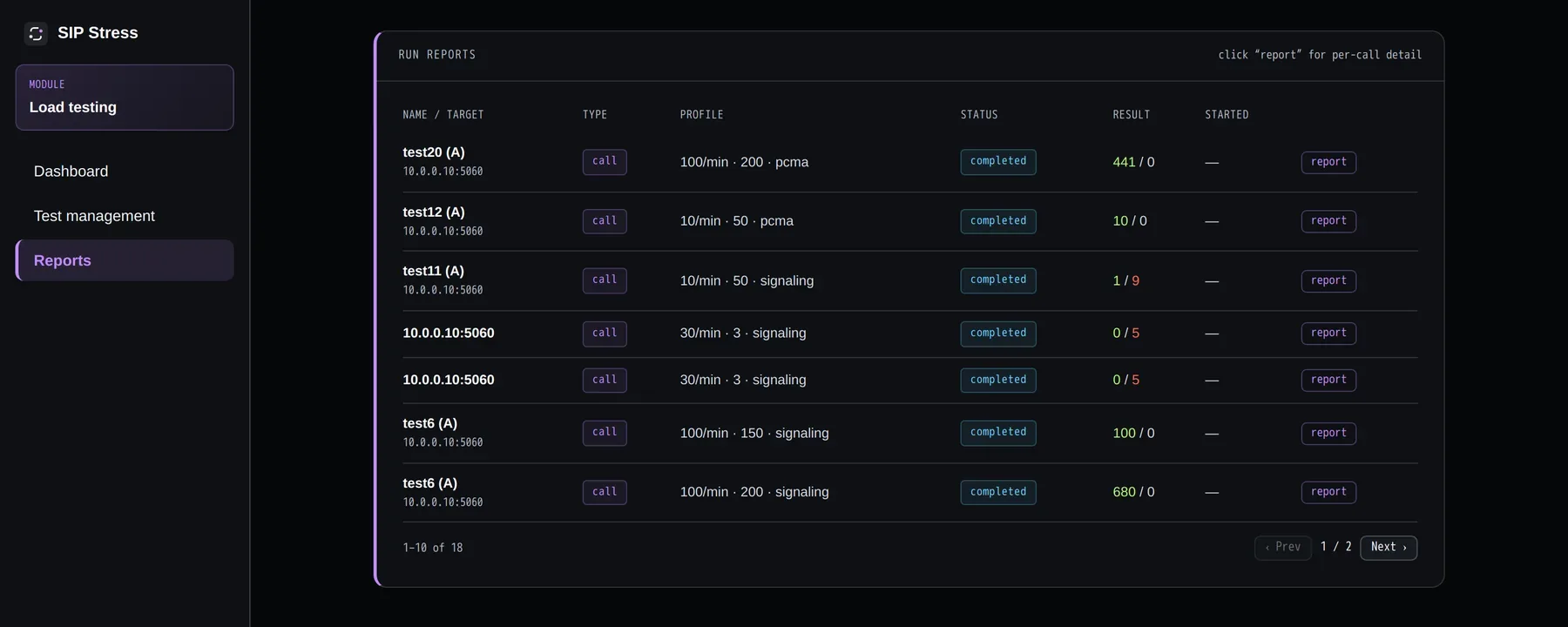
VoiceLab load testing: a run's report with calls attempted, answered and failed per leg
Load runs from a live tenant
AI assistant

Describe it, or ask why. The assistant does the groundwork.

VoiceLab now has an AI assistant that works inside your tenant, with your own permissions. It proposes, you confirm, and every figure it quotes comes from VoiceLab’s own records. An Ask AI button on call records, reports, SLA incidents and accounts opens it on that record.

Vibe-config
Describe the setup. Confirm the result.

Say what you want in plain words and the assistant drafts it: a test, an account, a profile, an SLA schedule, a report. You see exactly what will change, and nothing is sent until you press Confirm.

  • “Call 6002 from 6001 over PCMA and check the audio” becomes a test you confirm
  • Create or change accounts, SIP and media profiles, SLA schedules and reports
  • Checked against the same rules as the API before it is proposed
Vibe-analysis
Ask why. Get evidence, not a guess.

Ask why a call or a test failed. The assistant reads the call, its SIP ladder and its media results from VoiceLab’s own records, and marks every claim Observed, Likely or Unknown.

  • Analyse a call and explain a SIP response in the context of your own call
  • Compare the configuration of two accounts
  • Investigate an SLA incident against the same hours last week, and see what stands out in a report
Example conversation
Why did last night’s test to the Amsterdam trunk fail?
Observed: the INVITE was rejected with 503 Service Unavailable.
Likely: the SBC was refusing new calls at that moment.
Unknown: whether other callers were affected.
I can propose the same test again now. You confirm before it runs.
It never acts on its own
It cannot place a call or change anything without a person pressing Confirm.
It has your permissions, no more
It sees and changes only what the signed-in user could, and an administrator decides per role who may use it.
Captures stay in VoiceLab
Raw SIP messages and packet captures are not sent to the model, only the structured results.
Included in every plan, with 500, 2,000 or 6,000 AI credits a month.See pricing →AI assistant FAQ →
Solutions

Who uses it, and what for

Five kinds of team, each with a failure they have lived through. The full sequence for each is on the use cases page.

Deployment

Three ways to run it

The dashboard and the test agents are separate pieces, so you choose where each one runs — fully managed, fully self-hosted, or the hybrid most teams land on.

VoiceLab Cloud
Fully managed. Point it at your public SBCs and trunks and start testing — scaling, storage and upgrades are ours to worry about.
Nothing to install
Tests run from our agents
Upgrades handled for you
VoiceLab On-Prem
The whole platform self-hosted, for teams that keep every byte of call data inside their own perimeter — including sites with no internet at all.
Runs fully air-gapped
Offline installer and updates
Your own licensing terms

Agent nodes reach the dashboard over a single outbound HTTPS connection. There are no inbound firewall rules to open, and no VPN to maintain.

Get started

Start with one of your own routes

Every VoiceLab tenant is set up together with an engineer, against your own trunks, so the first results you see come from your network rather than a canned demo.

See it in action
See VoiceLab in action and discover the use cases that fit your network.
Book a walkthrough
A guided demo in our sandbox
Real calls, live results
Nothing to install on your side
Talk about deployment
For air-gapped sites, carriers and MSPs with their own constraints.
Contact us
Fully offline installation
Your own agent nodes
Licensing that fits how you operate
Or write to us directly at info@verifasnetworks.com. Existing customers: support@verifasnetworks.com